Audiocube 9 - Timeline, Splines, Gizmos, Shapes & More
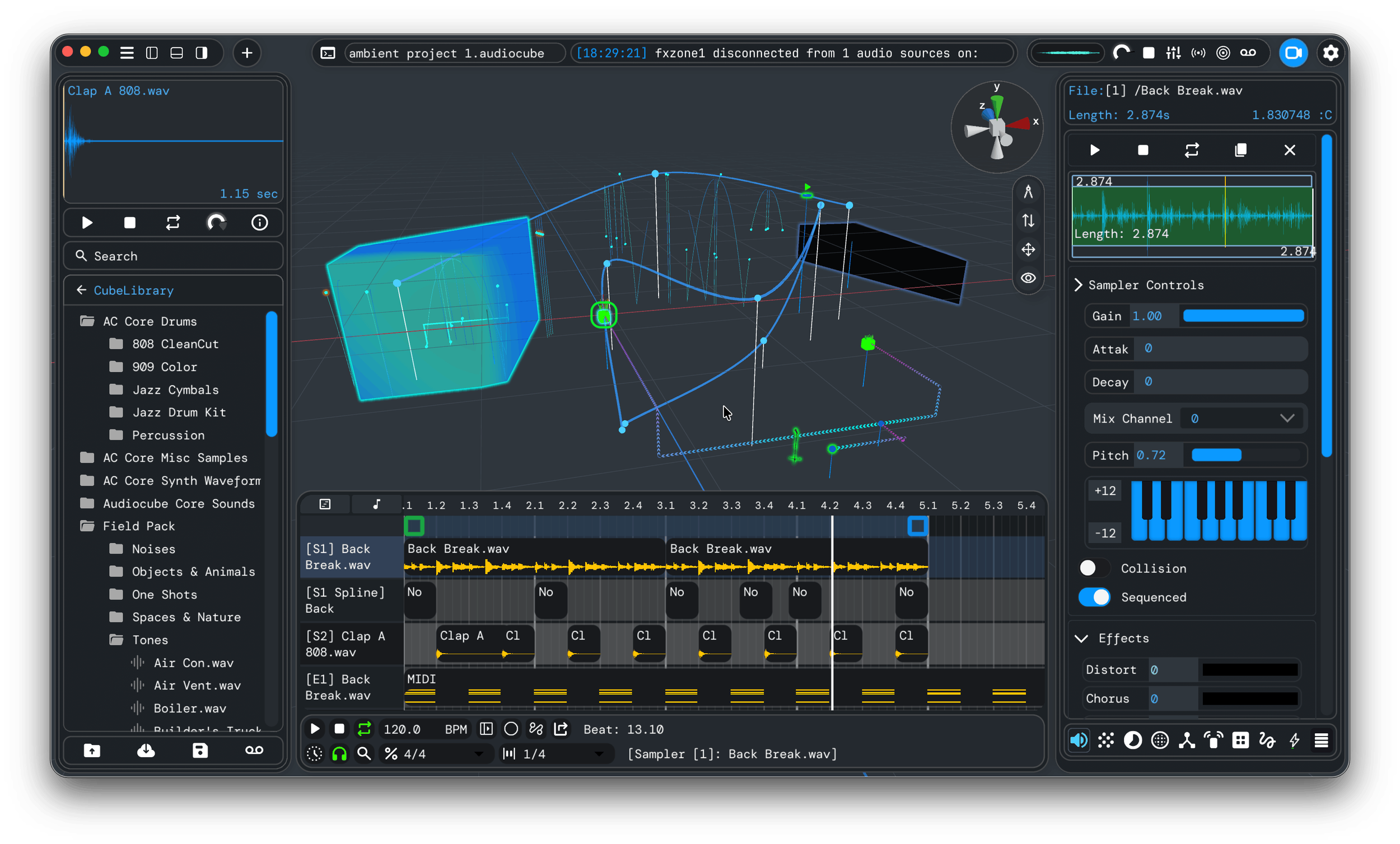
Audiocube 9 is now live!
This includes some of my proudest work yet, adding powerful features that I’ve wanted to build for a while. V9 lays the foundation for a professional, familiar, and sleeker future for Audiocube.
Driven by the fact that I’ve had more time to play with Audiocube, I could approach it from the user’s perspective - which highlighted many facets to polish.
This update is primarily focused on improving usability and familiarity while reducing friction, fiddle, and frustration.
And, I’ll share a sneak peak of some very exciting development progress (plugin support coming soon!)
This update, and all future updates are included for free with your Pro Licence!
Overview - Audiocube 9 Update
Timeline Editor - for creating complex compositions.
Spline Motion Creator - for precise movement animation.
Device Positioning Gizmos - for more intuitive device placement
Expanded Shape Editing - for Soundwalls and FX Zones
Quality of Life Improvements - to streamline the user experience.
The Big 5: New Features in Audiocube 9
Let’s start with the exciting stuff - these really challenged my programming skills.
After serious late-night grinding, I’ve built elements that I felt Audiocube has needed for a long time.
1) A Full Timeline Editor and Sequencer
Read the Timeline User Manual >
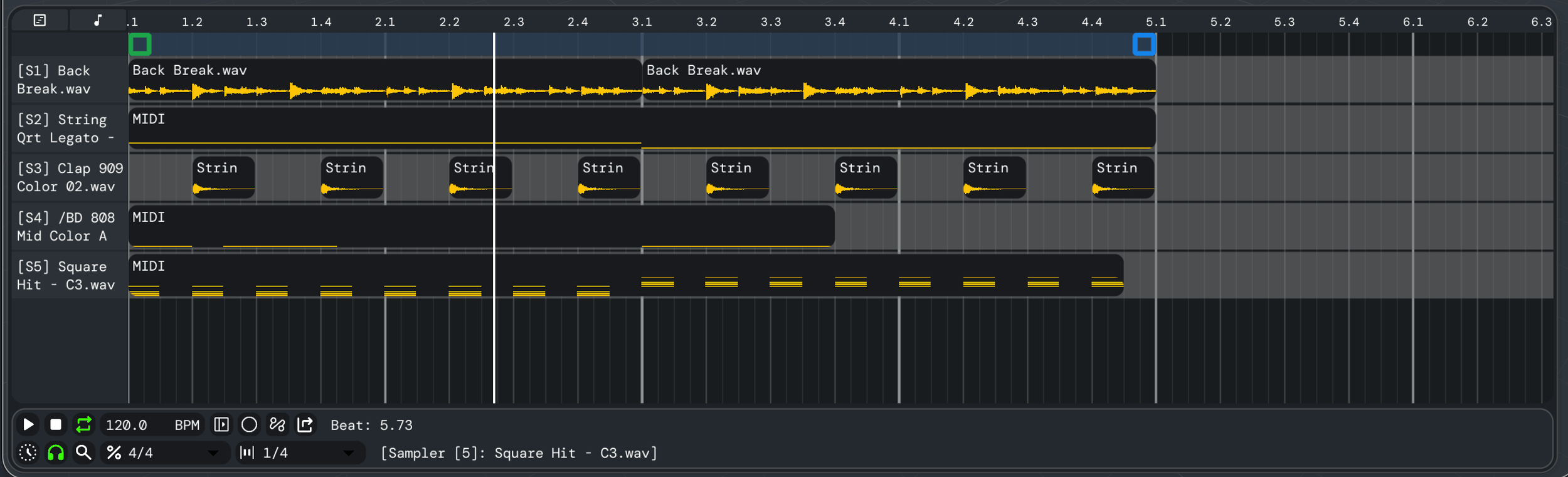
I added a fully fledged timeline editor/sequencer that works with both Audio and MIDI devices. It follows conventions from traditional DAWs to maximize familiarity and intuition.
The timeline editor can:
Precisely sequence audio and MIDI-based devices, enabling you to create complex beats and extended arrangements with devices:
Samplers
Emitters
Logic Boxes
Spline Motion Animators
Flexible Looping
Duplicate, Cut, Copy, Paste Audio and MIDI clips
Change clip start/end points
Use Ctrl/Cmd and drag an edge to timestretch an audio clip - so you can get samples in time with the BPM, etc., or experiment with pitch shifting
Select devices in the parameter editor and 3D scene for more seamless editing
Controls for subdivision and grid snapping
I plan on adding functions like automation lanes, velocity, clip fading, better editing, and other standard DAW timeline features. It’s the foundation for a more advanced timeline system - but I wanted to get it in your hands asap.
2) Spline Motion Animation

Read the Motion Animator User Manual >
This is a fun one. I’ve added a new ‘Spline’ mode for motion animation, making it easier to lay out movement paths for devices.
Use splines to create fully customizable motion paths for devices:
Select a device and pick Spline mode from the Motion UI Panel.
Drag nodes to direct the path.
Create new nodes by double-clicking existing nodes.
Delete nodes by dragging them into a neighboring node.

Nodes are editable on the timeline, providing full control over the path’s speed between each point.
3) Device Positioning Gizmos
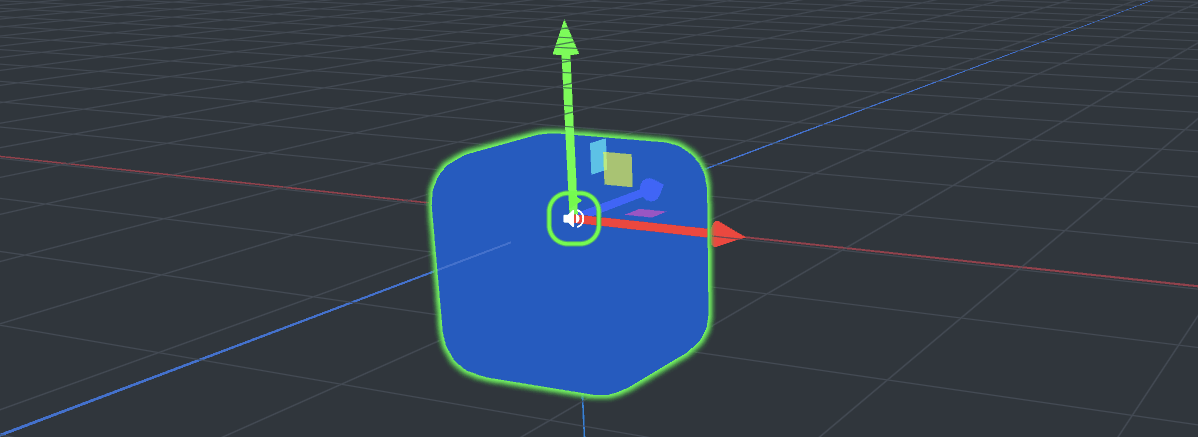
Positioning gizmos have been added to make device placement more intuitive and precise.
It includes arrows for single-dimensional movements and panes for dual-plane movements.
Toggled it with Alt+G, or in the camera control UI section.
The selection system (shift+click+drag) has been improved and implemented with the gizmo.
4) More Flexible Soundwall & Effect Zone Shaping
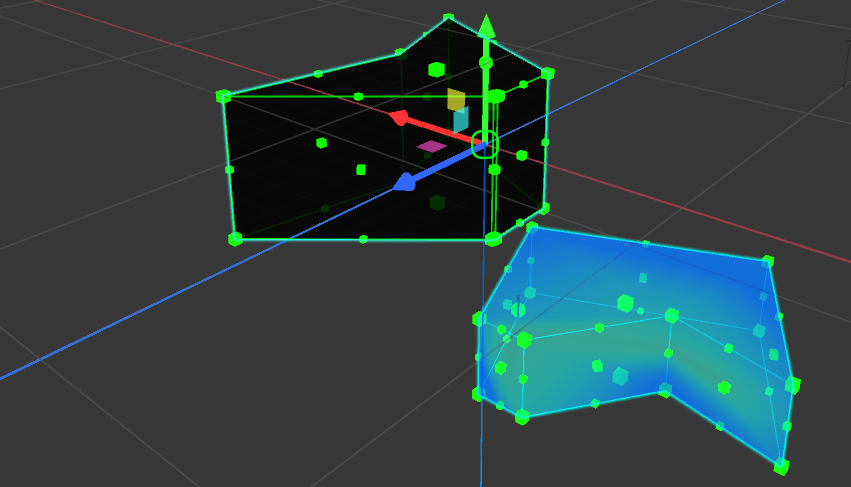
Shape editing tools for Soundwalls and Effect Zones have been expanded, enabling the creation of more complex acoustic geometry and effects boundaries.
Add and delete vertices and faces for infinite geometric shape types.
Move corners and vertices to precisely build custom layouts.
Sleek editing tools for intuitive building
I will continue to expand the flexibility here, enabling smoother shapes.
Under the hood, progress has laid the foundation for importing custom models, which will be a feature in a future update.
5) Device Randomizer
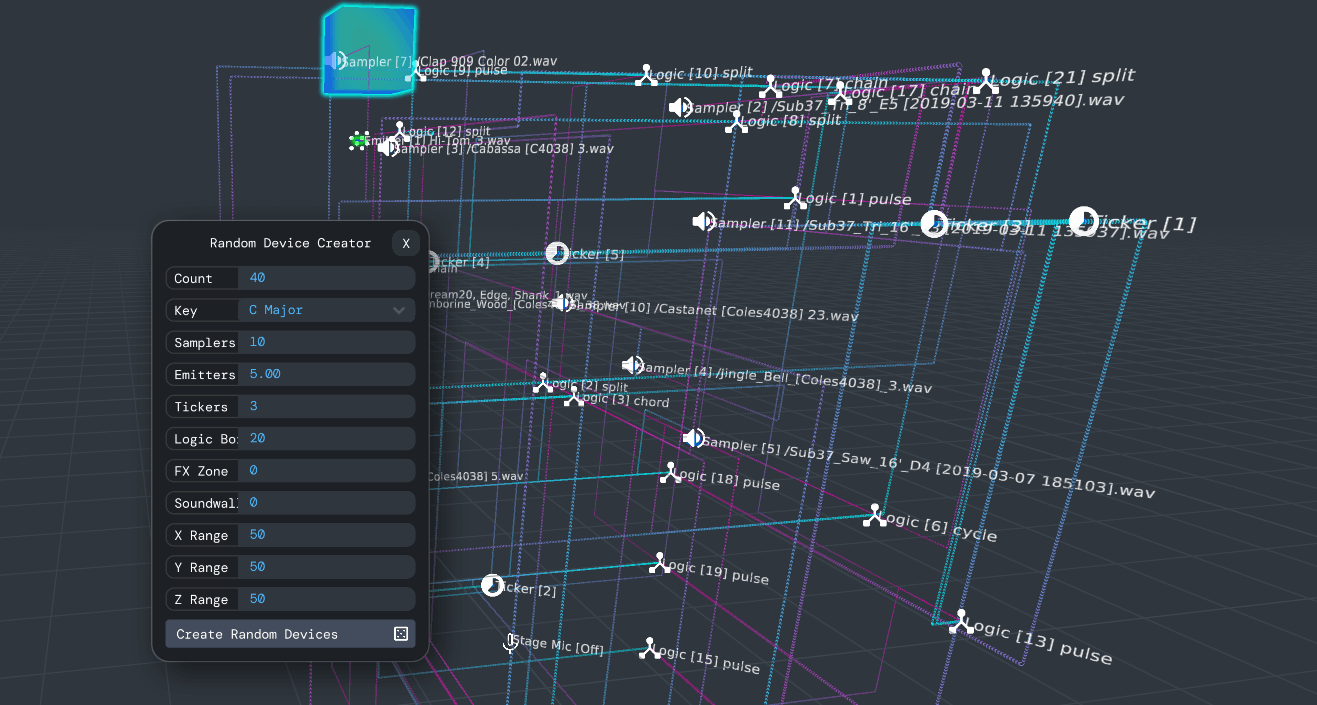
A chaotic experiment for those fans of generative and procedural music in the Audiocube community.
The Random Device Creator generates systems based on your chosen parameters, selecting random samples from your library:
Open the Randomizer from the add menu (top left)
Set your desired parameters for device count, type, spatial range, and the musical key to tune to.
Hit “Create” and let the beautiful chaos ensue!
It’s an interesting way to explore your sound library, generate new ideas, and just get a bit weird with it.
Don’t go too crazy with the numbers, though, as it can get laggy - experiment at your own risk!
Quality of Life Improvements
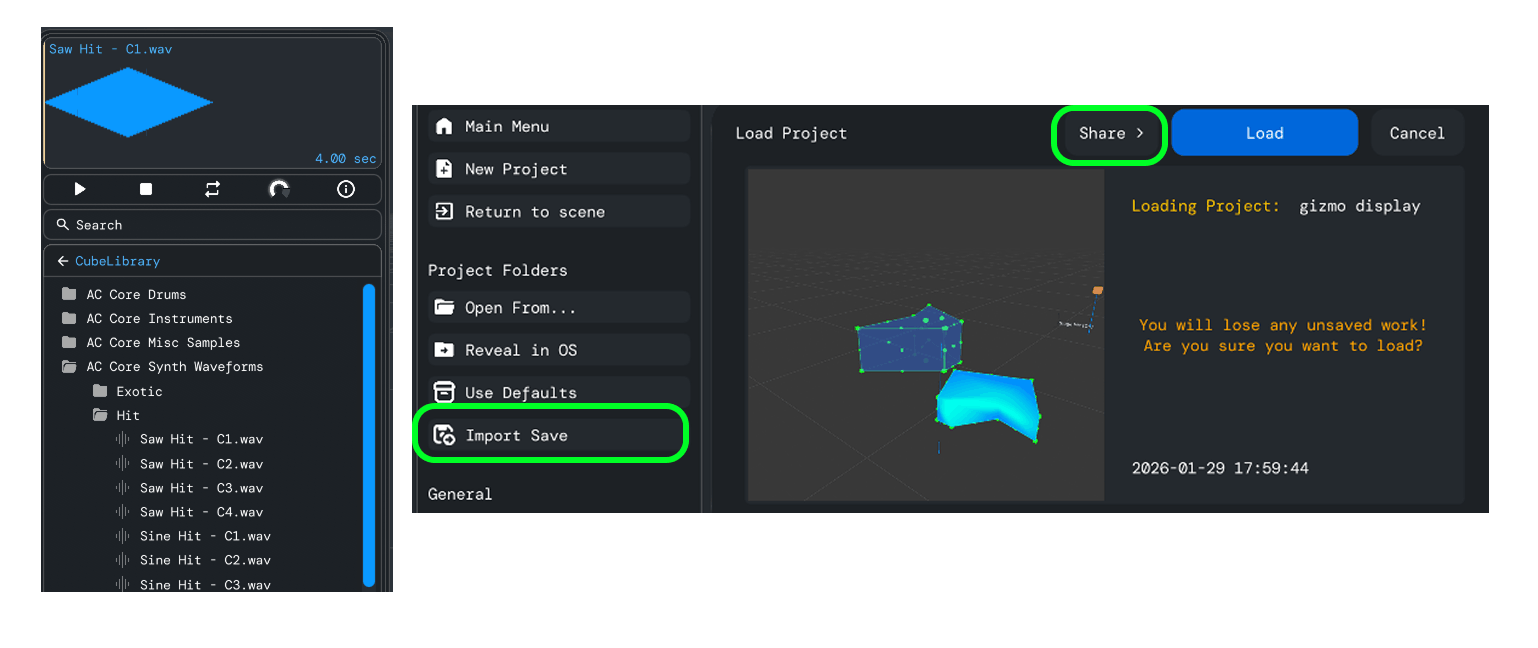
I’ve also polished Audicoube’s smaller details. Many subtle but important changes streamlined the user experience, creating a more professional feel.
Sample Browser Improvements
The left-side file browser has been improved for speed and comfort.
Collapsible folders - so you don’t have to fully dive in directories, and can now expand folders at will, making navigation easier.
Multi import - shift+click multiple samples and drag them in to create them all as separate samplers at once.
Improved scrolling - you can now scroll the mouse anywhere in the browser to navigate. Small but noticeable!
Project Import/Export, Bug Reporting
Audiocube projects can now be exported and imported as self-contained .zip folders. You can easily transfer projects between machines and share them with friends.
This lays the foundations for the online file sharing idea that I have, where users can upload and browse other users’ projects.
To Export Projects: Select a project from the project manager screen, click the Share button next to Load. It will automatically package all required audio samples.
To Import Projects: There is an import button on the left side of the project manager screen. Just navigate to an exported Audiocube project, and it will get added.
(I also added a bug/crash log sharing button, so I can fix issues more easily.).
Everything Else
Here is a list of all the other generic improvements:
IMPROVED: Knobs are more intuitive - mouse now returns to knob position after drag release, and can use mouse scroll to adjust.
IMPROVED: MIDI Editor is now integrated with the undo/redo manager
IMPROVED: Better device selection system and keyboard shortcutting
Ctrl + x/c/v/d to delete, copy, paste, duplicate all selected devices
Added undo, duplicate, selection, copy, and paste to the timeline editor, too.
IMPROVED: More terminal commands.
IMPROVED: Many more functions implemented into the undo/redo system
IMPROVED: Large refactoring of the save/load process
IMPROVED: Large refactoring of the project manager process
FIX: When using the save-as dialogue, pressing the space bar no longer triggers the midi playback
FIX: When changing the mixer channel of another device (the dropdown isn't updated)
FIX: Error loading samples for emitters on load
FIX: Fixed inaccurate version number on top left of project screen
FIX: Reflections and Occlusion enabled by default in Acoustic Settings
I probably missed a bunch of other stuff…
Audiocube Beta Sneak Peak!
Click to zoom in!
Here’s a sneak peak of my latest work, coming to the next version:
Minimap - Giving full control of placement, with a pop-out window, external to the main app.
Post-processing - A mastering rack with native effects, and…
Flow-Mapper - A unique method of arranging audio effect chains
Plugin Support - AU and VST support is now working on the master!
I’ve made some huge breakthroughs with plugins, external windows, and more. So I’m really excited to expand the software. Stay tuned!
Plans for the future (Audiocube 10!)
The next update(s) will focus on the following:
Redoing the mixer and effects system - It’s super old and rigid. I see a huge range of improvements, and I am working on a more flexible design.
Formats and techy stuff - It’s about time to look into multi-channel output and a wider range of formats. I’ve made some progress here, but it’s one of the most requested features, making it a priority for me to add.
Online Sharing - I want to create a platform for people to share their Audiocube projects.
Optimizations - Many things can be optimized for better performance.
Timeline Upgrade - The timeline is still raw. Automation, velocity, better selection and editing, etc…
That’s all; for now…
I’m proud of this one, and I’m sure you’ll all be excited to get stuck in.
Note: There may be issues with project save file compatibility between older Audiocube versions. Make sure that you label important projects with the version of Audiocube you used. Because V9 is drastically different, and the save data structure has changed, old projects might not load (but now you can make much cooler ones anyway)...
Thanks again for all your support! The last few months have been really promising with sales, and I’m nearly working on Audiocube full-time. I think in the next couple of months I’ll be able to dedicate myself 100% to the project, which is super exciting for me and you both!
I couldn’t have done it without the Audiocube community.
As always, feel free to send over your ideas to noah@audiocube.app or reach out on the discord or Instagram.
Enjoy Audiocube 9!
Thanks,
Noah
