The 7 Best Spatial Audio Plugins in 2026
I share the best spatial audio plugins available today, ranked on functionality, quality, and value for money. An essential read for musicians and audio producers.
I’ve been using and creating spatial audio tools for years - and throughout this time I’ve noticed several problematic trends within the field.
I think spatial audio plugins and tools are now essential for anybody working in audio production today. Spatial audio technology enables users to create listening experiences with a sense of depth, realism, and immersion that can’t be achieved with standard stereo mixing tools. Neglecting these tools limits your competitive edge.
Instead of limiting your sound to two channels, or a flat 2D plane, spatial audio vst plugins allow you to create truly three-dimensional sound experiences, where the listener feels like they are directly inside the sonic scene.
I’ve always placed a lot of value in immersive audio tools for music and audio production, and find they make it easy to create more expansive sound stages. However, I’m generally disappointed by the user interface, experience, and sound quality of products in this area.
So I decided to create my own spatial audio software from scratch - designed from the ground up to work with 3D audio and provide a streamlined, intuitive workflow.
In This Article
I share the best spatial audio plugins available today.
You’ll understand what spatial audio plugins are, how they work, and why they’re useful.
Learn how to integrate spatial audio into your mixing workflow for a deeper sound
Discover the Audiocube Space plugin, and Audiocube Studio DAW
New Spatial Audio Plugin: Audiocube Space
Before getting stuck into the details, I’m just going to quickly share my contribution to the spatial audio field.
Audiocube Space is a spatializer plugin that transforms your DAW into a sound design powerhouse. By bringing Audiocube’s cutting-edge 3D audio engine directly into your DAW, Space enables exciting new techniques for sculpting sound with enhanced realism and immersion.
I designed Audiocube Space to fill in the gaps of other spatial audio software. By blending spatialisation, acoustic simulation, creative processors, and an intuitive 3D interface, Space opens new dimensions of sound design and time saving workflows.
Audiocube Space - Notable Features:
3D Audio Spatialization: Place sound sources and listening positions anywhere in a 3D environment with absolute freedom of height, depth, and direction.
Pristine Acoustic Modelling: Simulate the physics of sound in real-time. Harness complex acoustic behaviours, including absorption, reflections, occlusion, directivity, and Doppler effects.
Harmonic Granulator: Expand simple sounds into evolving textural soundscapes using generative granularisation with tempo, key, scale, chord, and creative controls.
Multi-Channel & Binaural: Distribute audio across surround systems from stereo to 9.1.6+ arrays, or apply HRTF binauralization for pinpoint headphone immersion.
Instance Linking: Streamline your workflow by accessing and moving any audio source from a single plugin window. Synchronise listening positions to effortlessly simulate moving through your audio scenery.
Works in any plugin compatible DAW: VST3/AU/AAX formats, supported by Ableton Live, Logic Pro, FL Studio, Pro Tools, Studio One, Bitwig, Garageband, Reason, Reaper, Cubase, and more.
Designed for anyone working with sound. Trusted across the industry by musicians, producers, sound designers, mix engineers, film and game studios, post-production teams, spatial specialists, and creators worldwide.
For more details, check out the main page for Audiocube Space, or the announcement blog post
What Is A Spatial Audio Plugin?
A spatial audio plugin is a type of AU, AAX, or VST plugin you use inside your DAW, to apply spatial audio processing, such as binauralization, multichannel output, acoustic simulation, directionality, and more. They come in many forms, designed for different situations, but often come with similar features.
Spatial audio plugins typically offer controls for adjusting sound placement to enhance the dimensionality of your mixes. They let you move sound around, above, and below the listener - and can feature acoustic simulation and reverb processing.
Spatial audio software is ideal if you want to create more immersive listening experiences, and can be used in a range of scenarios: from cinema, to audiobooks, and theatres to hypnotherapy.
Thanks to binaural audio technology, you can achieve the surround effect on headphones alone.
Recommended Articles:
The 7 Best Spatial Audio Plugins - My Top Picks
As an active user of spatial audio technology I always stay up-to-date with the best products on the market. Below, I share my favourite spatial audio plugins available today.
1. Audiocube Space - The Latest & Greatest Spatial Audio Plugin
As I explained earlier, the lack of intuitive and powerful spatial audio processors motivated me to create my own. I felt that the interfaces often sucked, the quality was limited, and products didn’t take advantage of the full capabilities of modern spatial audio technology.
Originally I created the Audiocube Studio DAW, a standalone spatial audio app, but I’ve recently released the Audiocube Space Plugin, which brings the 3D audio engine tech directly into your DAW.
Best For: Musicians, producers, and sound designers looking to explore the full power of modern technology for spatial audio.
Why I Love it: Ok, I did make this one myself… But I feel I can give it fair praise as someone who used all the existing tools. Space is unique in the fact that you can connect all plugin instances for a truly intuitive placement workflow. Also, the linkable listening position lets you move your perspective around the scene, saving hours on fiddly automation - a truly unique feature in this market.
Unlike other plugins on this list, Audiocube Space is a full spatial audio environment in your DAW - giving you full control over sound spatialization, acoustic simulation, room reflections, sound movement, and more.
It also features multi-channel output so you can create fully immersive experiences on speaker setups from stereo, to quad, 7.1, 9.4.6 and beyond. The binauralization processing enables perfect translation of spatial experiences on headphones.
2. Dear Reality DearVR Pro - A Powerful Spatial Audio Plugin
I got started with DearVR Pro when I was working with spatial audio - and they had fantastic products back in the day. These are now slightly outdated, and the company has been absorbed by Sennheiser, meaning they are no longer under development. (Although you can use all their plugins for free.)

It’s a great audio spatializer for single-source related tasks, and the reverb simulation is pretty decent. Although the UI can be a bit restrictive for complex scenes, and requires a tonne of automation to give the impression of a moving listening position. (Something solved in Audiocube Space).
Best For: Music producers, game audio designers, and post-production engineers who need a single, flexible plugin that can handle almost any immersive audio task inside their existing projects.
Why I Love It: The quality of the room simulations is great. The ability to switch between output formats on the fly makes it incredibly efficient for testing how a mix will translate across different systems. The visual interface is intuitive and inspiring to use.
3. Dolby Atmos Production Suite - Pro Grade Dolby Atmos Spatial Audio
The Dolby Atmos renderer is pro grade, high quality spatialization. It's complex and a bit clunky, but it meets the technical depth you need if you're working on high end productions like film, TV, and video games.
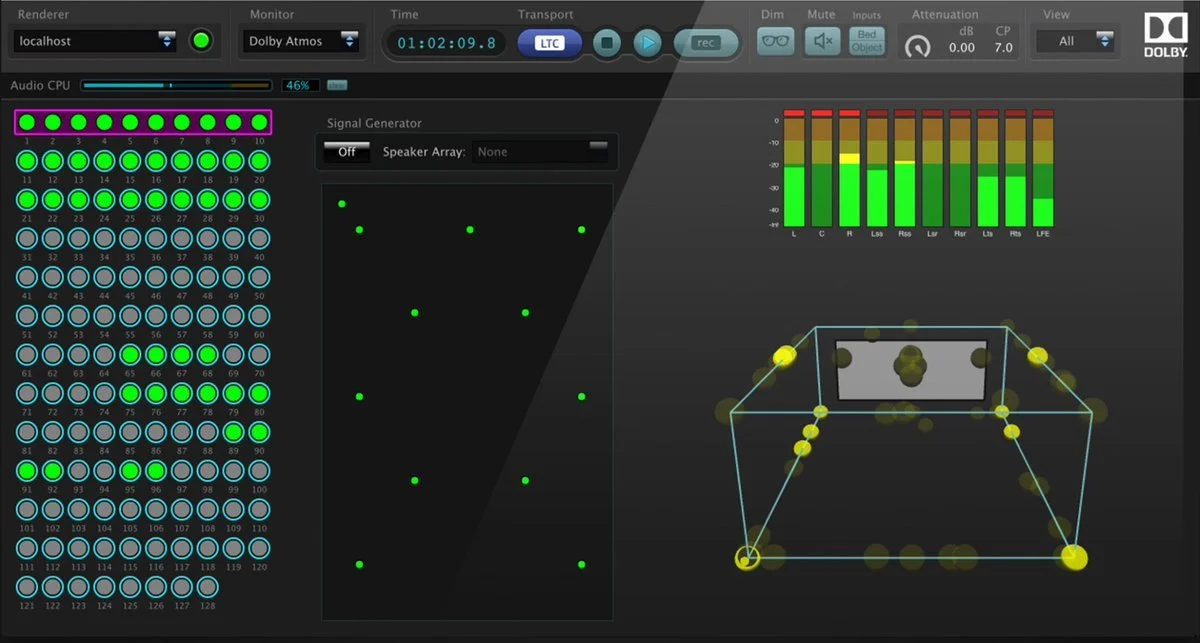
It might be overkill for simple tasks, but it’s viewed as an industry standard for those working on commercial film projects.
Best For: Professional music producers and post-production engineers who need to deliver official, certified Dolby Atmos mixes and work within the established industry ecosystem.
Why I Love It: It’s the genuine article. Mastering this workflow is a major step up for any audio professional. The deep integration with DAWs like Pro Tools, Logic Pro, and Nuendo is seamless.
Things to Consider: It represents a significant shift from traditional channel-based mixing and has the steepest learning curve of any tool on this list.
4. Fiedler Audio Spacelab - An Expansive Spatial Reverb Plugin
Spacelab is a unique spatial audio reverb combining state-of-the-art reverberation with granular object-based panning. It allows you to place sound sources in a virtual soundstage and then shape the room's reflections around them with surgical precision. Its "spectral-spatial" reverb engine sounds lush and unbelievably realistic.
Best For: High-end music producers and sound designers looking for a premium, all-in-one creative tool for spatialization and reverb.
Why I Love It: The sound quality is simply stunning. The reverb doesn't just feel "added on"; it feels completely integrated with the panned sources.
5. Sennheiser AMBEO Orbit
Sometimes, you just need a simple, effective tool. This free binaural panning plugin is designed to be as intuitive as possible, letting you position mono or stereo sources within a 3D sound field for headphone listening. Key features include a "Clarity" control to manage spectral colouration and a "Width" control for stereo sources.

Best For: Musicians, podcasters, and producers who want to experiment with spatial effects or add a touch of 3D depth to their mixes without a steep learning curve or financial investment.
Why I Love It: It’s free, lightweight, and incredibly easy to use. For quickly adding immersive movement to a synth pad or placing a voice-over, it’s a fantastic starting point. A must-have in any plugin folder.
6. Waves Nx – Abbey Road Studio 3
This one is different - it’s not for creating spatial audio, but for monitoring it. The Waves Nx Abbey Road Studio 3 plugin re-creates the precise acoustic environment of the legendary Abbey Road Studio 3 control room inside your headphones. Using advanced psychoacoustics and optional head-tracking, it creates a convincing illusion that you're mixing on the studio's world-class 7.1 surround system.

Best For: Any producer or engineer mixing immersive formats (like surround or Atmos) on headphones. It provides a reliable reference point that helps your mixes translate better to speaker systems.
Why I Love It: It solves the biggest problem for home studio producers: not having an expensive surround sound speaker setup. The realism is uncanny and gives you confidence when making mixing decisions.
7. Facebook 360 Spatial Workstation
A foundational toolset in the world of VR and 360° video, the Meta 360 Spatial Workstation is a comprehensive and - most importantly - free suite of plugins. It’s built around the Ambisonics format, providing tools for spatializing, mixing, and exporting audio that will sync perfectly with 360° video platforms like YouTube and Meta Quest.

Best For: Content creators, filmmakers, and developers working specifically on VR and 360° video projects, especially those on a budget.
Why I Love It: For a free product, the suite is remarkably complete. It was one of the first truly accessible toolkits for VR audio, and it remains a vital resource for creators in that space.
Explaining The Different Types Of Spatial Audio Plugins
The term ‘spatial audio plugin’ is an umbrella categorisation, with multiple different sub-classes of plugins and processors.
Each type of spatializer has its own strengths depending on the format and type of project you're working on:
Ambisonics Plugins: Ambisonics plugins, like the Facebook 360 Spatial Workstation or Sennheiser AMBEO, allow you to work with Ambisonics audio formats that capture sound from all directions in a 360-degree sphere. These plugins are great for VR and 360-degree video projects, where fully immersive sound is crucial, or Dolby Atmos content.
Binaural Plugins: Binaural audio plugins, such as DearVR and Waves Nx, are designed to replicate how humans hear sound naturally. These tools are especially effective for creating realistic 3D audio experiences when listened to through headphones, making them ideal for music production, ASMR, and gaming.
360 Audio Tools: Plugins like the Audio Ease 360pan suite are optimized for creating audio for 360-degree content, making them perfect for VR or AR environments. These tools allow you to position sound with precision and adjust its movement in sync with visual content.
Each type of plugin serves its purpose, whether you're working on a music mix, designing game audio, or creating a fully immersive VR project. The choice of plugin largely depends on how and where your final audio will be consumed.

How To Use Spatial Audio Plugins In Your Music Production Projects
Spatial audio plugins are great tools for quickly adding immersive depth to your mixes and productions, and can be used in a range of workflows to achieve different results.
Here are a few steps on how you can integrate spatial audio software into your workflow:
Choose the Right Plugin: Select a plugin based on your project. For music destined for platforms like Apple Music, a binaural panner (like DearVR Pro) is perfect. For VR, 360-degree video, or Dolby Atmos mixes, an Ambisonics tool (like the Sennheiser AMBEO Orbit) is a better fit.
Set Up in Your DAW: Load your chosen plugin as an insert on any audio track in your DAW (Logic Pro, Pro Tools, Reaper, etc.). This will give you direct control over that sound's position in 3D space.
Position Your Sound Sources: Use the plugin's visual interface to manipulate your audio. Drag sound "objects" to adjust their height, depth, and direction to build a 360-degree soundscape that surrounds the listener.
Export for Your Platform: When your mix is complete, export it in the correct format. Render to a binaural stereo file for headphone-focused music streaming, or use Ambisonics formats for VR, gaming, and 360-degree video platforms like YouTube.
For a deeper dive, check out my guide on How To Make Spatial Audio .
Audiocube Studio: A Standalone Spatial Audio Application
In addition to Audiocube Space, I’ve also released Audiocube Studio, a 3D DAW - a spatial audio app for creating sound in your own virtual 3D space. I made it as a standalone software, so it can break free from the limitations of the vst plugin format.

Audiocube is not just another plugin - it's a standalone 3D audio software designed to revolutionize the way you work with spatial audio.
Unlike traditional plugins, which are often restricted by the DAWs they operate within, Audiocube opens up new possibilities for sound manipulation and immersive design.
Being a self-contained software suite, Audiocube allows you to craft audio environments and workflows that are impossible to achieve with just plugins.
Audiocube gives you a fully customizable 3D studio, with realistic audio spatialization and complete freedom of movement.
Audiocube's Standout Spatial Audio Software Features
3D Audio Workstation: Audiocube lets you import, spatialize, sequence, process, mix, master, and export audio, all in one place. You can fully control how sound behaves in a 3D space without relying on external tools or plugins.
Real-time Acoustic Simulation: With Audiocube, you can simulate real-world acoustic effects like reflections, occlusion, and binaural rendering HRTF, adding an extra layer of realism that plugins can't easily replicate.
Generative Music Tools: Audiocube offers generative tools that allow you to experiment with randomization, physics-based collisions, and cyclic sequencing - ideal for creating unique soundscapes and evolving audio patterns.
Spatial Automation: One of the core features is the ability to automate sound movements over time, adding dynamic movement and depth to your compositions. Whether you're working on an ambient track or a complex VR soundscape, this is a game-changer.
Custom Acoustic Environments: You can create bespoke environments with control over variables like distance attenuation and air absorption, ensuring precise sound propagation throughout your virtual space.
High-Quality Export: Audiocube also supports high-quality WAV export, meaning you can seamlessly integrate your spatial audio creations into other software or share them directly.
I'm constantly listening to user ideas to add more features and add performance improvements, so please try Audiocube for free and send in your feedback!
The Difference Between Spatial Audio Plugins and Standalone Software
While plugins are useful, they are ultimately limited by your Digital Audio Workstation (DAW). Standalone software, purpose-built for immersive audio like Audiocube, offers superior power and flexibility. Here’s why:

Unmatched Performance: Standalone apps directly access your computer’s full processing power, avoiding the bottlenecks plugins create within a DAW. This allows for more complex spatial processing and larger projects without performance hits.
More Accurate Simulations: Free from a DAW's constraints, dedicated software can run the detailed physics calculations needed for realistic reflections and effects that plugins often have to simplify.
Streamlined Workflow: These apps provide a focused, end-to-end environment for importing sounds, positioning them in 3D, and exporting professional files, eliminating the need to juggle multiple plugins.
Greater Creative Freedom: Built from the ground up for spatial sound, they provide innovative tools and experimental features not possible within the rigid structure of a traditional DAW workflow.
Start Expanding Your Mixes With Audiocube!
Spatial audio plugins have changed the way we approach immersive sound design, offering new creative possibilities in modern audio production. This cutting edge tech lets you transform your stereo mixes into something much more immersive.
If you're looking for a more expansive workflow that breaks the boundaries of traditional plugins, Audiocube is the perfect tool
